01 · In the page
Selection Rewrite
Select two or more words in a supported field. Choose Rewrite, Fix grammar, or Shorten. Nothing changes until you replace or copy the result.
Free Chrome writing assistant
Select text in a supported field, choose RewritePal, and review one result before it replaces anything. Local English checks stay on your device.
Free to install
Pause any website anytime
Email draft
Hi Alex,
Thanks for the recap. I wanted to quickly circle back on the timeline so we are aligned before Friday.
Result · Professional
I wanted to confirm the timeline so we stay aligned before Friday.
One extension, three speeds
Selection Rewrite is the reason to install. Inline Fix and the popup stay beside it, with independent controls.
01 · In the page
Select two or more words in a supported field. Choose Rewrite, Fix grammar, or Shorten. Nothing changes until you replace or copy the result.
02 · Local
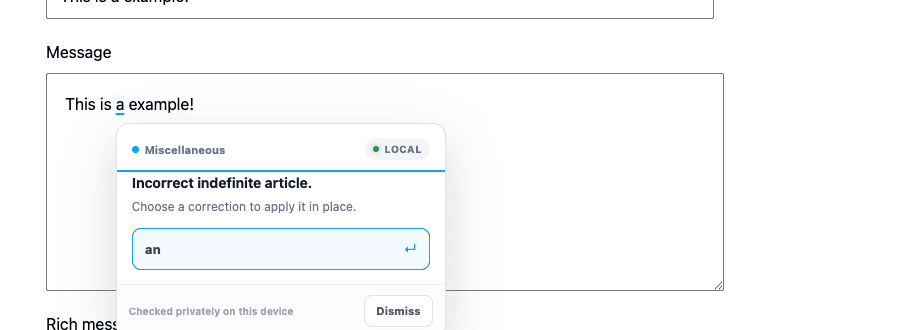
Optional English checks. The focused text is not sent to RewritePal. Turn it off without disabling Selection Rewrite.
03 · Toolbar
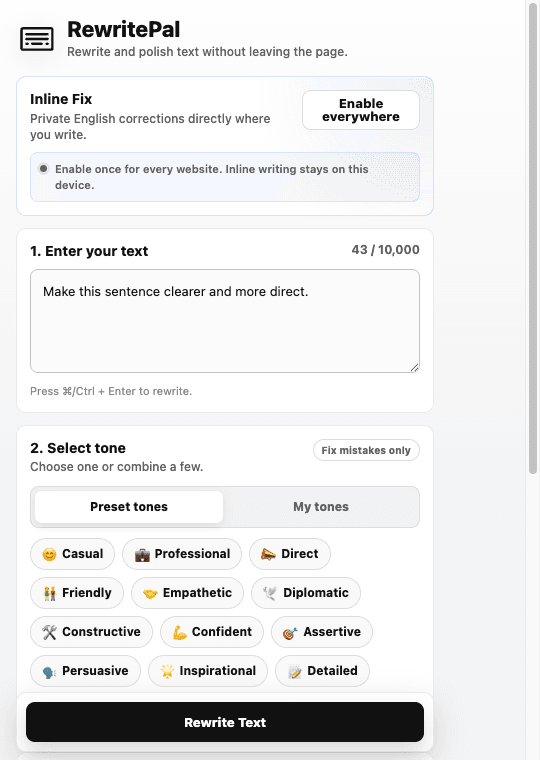
Tone, role, language, and history in the toolbar. Use this when a website editor is not supported, including Google Docs.
How it works
Enable website tools when you want RewritePal beside the fields where you already write. The popup stays in the toolbar for everything else.
Install RewritePal from the Chrome Web Store and pin it for quick access.
Approve website access once, then choose Selection Rewrite, Inline Fix, or both.
Highlight two or more words in a supported field. Selecting text does not send it.
Choose Rewrite, Fix grammar, or Shorten. Replace or copy only after you like the result.
Your data
Inline Fix never leaves your device. AI runs only after you choose RewritePal or another rewrite action.
Stays on your device
Sent only after you click
Made for the open web
Improve the short messages and everyday fields that are too small for a separate document editor. Selection Rewrite and Inline Fix do not support Google Docs yet. Use the popup there.
FAQ
The short version: local checks are private, AI rewrites are explicit, and you control each website tool separately.
RewritePal adds Selection Rewrite and optional local Inline Fix to supported writing fields. Select text, choose RewritePal, and review one result before replacing it. The popup remains available for focused rewrites and unsupported editors.
Yes. Inline Fix checks the focused eligible field locally in the extension with Harper. That text is not sent to the RewritePal API. AI rewrites are separate and send only the text you explicitly submit for rewriting.
Selection Rewrite and Inline Fix work in standard textareas, supported text inputs, and standards-based rich-text editors on ordinary websites after you enable website access. Some specialized editors, embedded frames, and Google Docs are not supported yet. The popup remains available as a fallback.
Yes. Enable website tools once, then use Pause here for any site where you do not want them to run. Selection Rewrite and Inline Fix also have independent switches, and you can remove website access everywhere.
You can install RewritePal for free. Local Inline Fix corrections do not use AI actions. AI rewrites use the daily allowance shown in the extension, and a free account unlocks the higher free allowance.
Inline Fix currently checks supported English text only and skips text that Harper does not identify as likely English. The separate AI rewrite workflow supports the output languages available in RewritePal.
Write where you already work
Install RewritePal, rewrite selected text in place, and keep local corrections on your device. AI runs only after you choose it.
Opens the official Chrome Web Store listing.